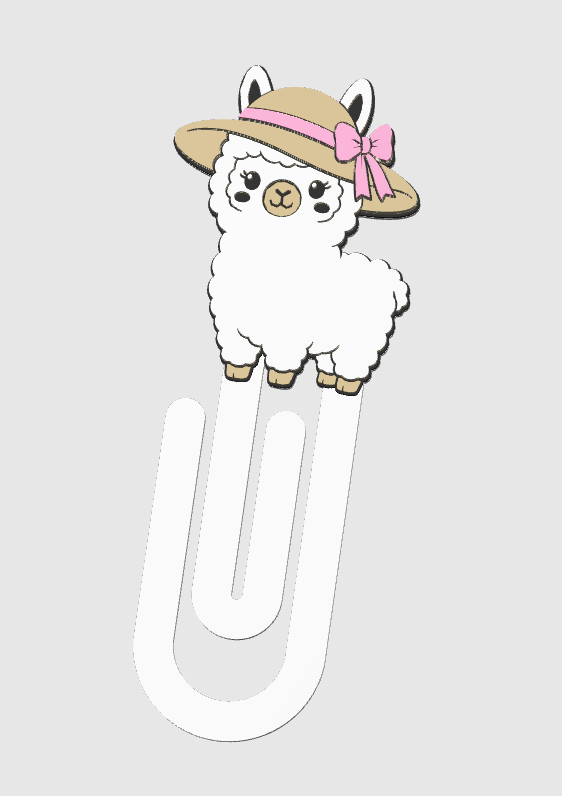
Summer Llama Paper Clip 3D Print File (STL & 3MF Digital Download)
Summer Llama Paper Clip 3D Print File (STL & 3MF Digital Download)
ONE TIME PURCHASE - NO RECURRING FEE
Couldn't load pickup availability
Custom Icons
Custom Icons
*NFC BASES ONLY*
If you would like custom icons on your base, please leave a note in the instructions at checkout or reach out through the Contact page after placing your order.
📝 One custom base request per order, please!
🦙☀️Cute Summer Llama Jumbo Paper Clip.☀️🦙
🛑 Usage License – Please Read
Personal & Commercial Use Allowed
✔ You may 3D print and sell physical items made from this file
❌ You may NOT sell, share, or distribute the digital files
❌ You may NOT modify the file and claim it as your own
❌ You may NOT copy images, descriptions, or listing concepts
🩷 Designer credit is always appreciated, but not required
⚠️Please Read Full Description/Disclaimer⚠️
📥 DIGITAL DOWNLOAD ONLY – No physical item will be shipped.
🖨️This file is designed for Single & Multi-Color 3D Printers🖨️
⏯️Yes, the pauses are included in the 3MF files ONLY (STL files cannot contain print data and pauses)
🖨 Recommended Print Settings:
Layer Height: 0.2mm
Nozzle: 0.4mm
Infill: 10-15% gyroid
Supports: Not required
Material: PLA (test printed)
Single Color Printer Directions for 5 Color:
•Pause Layer 9: White to Black
•Pause Layer 14: Black to Light Brown
•Pause Layer 19: Light Brown to White
•Pause Layer 24: White to Yellow
•Pause Layer 29: Yellow to Pink
*When using 0.2mm layer height*
**Colors can be changed to filament colors of your choice**
Single Color Printer Directions for 4 Color:
•Pause Layer 9: White to Black
•Pause Layer 14: Black to Light Brown
•Pause Layer 19: Light Brown to White
•Pause Layer 24: White to Light Brown
•Pause Layer 29: Light Brown to Pink
*When using 0.2mm layer height*
**Colors can be changed to filament colors of your choice**
5 Color When using AMS:
•AMS Slot 1: White
•AMS Slot 2: Black - switch to Yellow after black has printed (layer 19)
•AMS Slot 3: Light Brown
•AMS Slot 4: Pink
*Set the Black and Yellow to the same AMS slot number in your slicer before printing. After the black has printed, remove the black filament from the AMS and replace it with the yellow filament.*
**Pause is added in the "5 Color" 3MF file at layer 19, when using a 0.2mm layer height**
***Colors can be changed to filament colors of your choice***
💡 Need Help? Feel free to reach out if you have any questions!
⚠️ DISCLAIMER⚠️
FILE COMPATIBILITY NOTE: The included 3MF files work best in Bambu Studio and Orca Slicer, as they may contain slicer-specific settings. If you are using a FlashForge printer or a different slicer, please use the STL files provided.
📌 By purchasing this file, you acknowledge and agree to the following:
-You must have knowledge of 3D printing and understand how to use your own printer, slicer settings, and materials.
-These files have been tested and optimized for 3D printing, but individual results may vary depending on your printer, settings, and filament choice.
-No refunds will be issued for digital files.
-Reselling, sharing, or distributing the digital file is strictly prohibited.
I am happy to answer general questions, but the responsibility for a successful print is yours. Please ensure you are familiar with 3D printing before purchasing.
Thank you for supporting my designs! Happy printing! 😊🎨
Share